How to Install Windows 7,8,10 In Just 10 minutes
We do have to spend so much time when formatting PC. We are obliged because of windows installation speed. But using simple commands we can do this very quickly. This Time I will explain How to Install windows 7,8, and 10 In Just 10 minutes. This is a simple trick and many people knows it many people still not aware of it.
As We all know that During Formatting a Computer After the File Copying is Completed then windows Require approximately 39 Minutes Time.
But, We can Bypass this faking Time. If you are wondering how this is possible than read those simple steps
I have Included Snaps Shots That will help you (Though it was taken when i was using Xp but it’s quiet same on newer versions).
I have Included Snaps Shots That will help you (Though it was taken when i was using Xp but it’s quiet same on newer versions).
STEP 1 :
After the Copy Part is Over … System is Rebooted as we all know In general Foramatting Procedure…
Now After Reboot The Below Image Will Appear (in windows XP, In windows 7 screen will be shown as above image)….

STEP 2: Now As This Image APPEARS You Have to Press “Shift + F10 ” . This Will Open The command Prompt… Now type taskmgr in it. This will open the Task manager .
STEP 3 : After The task Manager Opens Goto Processes … And Find “Setup.exe” process and Right CLICK on It…. and set the Priority to Highest….
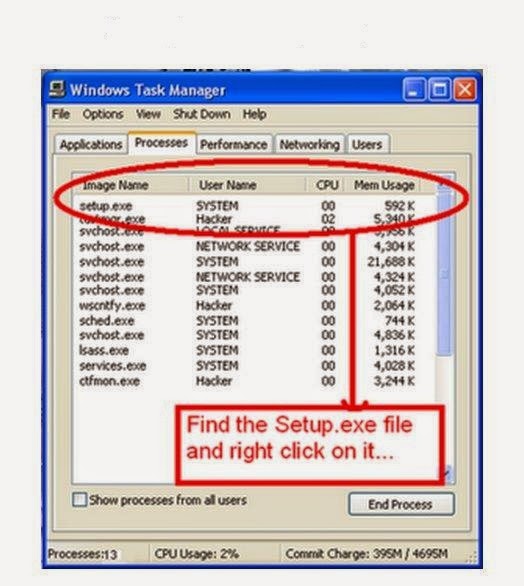
STEP 4: Now Just Watch the Set It will take around 9 minutes and 2 minutes for Tolerance (depends System to system)….
That’s It.You Can Use this method in Both Windows 7 And Vista
So When you Format your PC Next Time It will Really Save Your TIME i.e around 20 to 25 minutes….Enjoy.
NOTE: this post is not created by us.
NOTE: this post is not created by us.

No comments:
Post a Comment